
The landscape of iOS development has dramatically shifted in 2025. With Apple’s introduction of Xcode 26 at WWDC 2025, which integrates ChatGPT and supports multiple AI models through API keys, and Anthropic’s release of Claude Code as a powerful command-line tool for agentic coding, developers now have unprecedented AI-powered development capabilities.
While Xcode 26 beta 7 now includes built-in support for both ChatGPT 5 and Claude Sonnet 4, many developers find that Claude Code offers a more flexible and powerful approach to AI-assisted development. This guide will show you how to integrate Claude Code with your Xcode 26 workflows for maximum productivity.
⚡ This is Part 1 of our Claude Code series. In Part 2, we’ll push things further by building a complete Task Manager app, orchestrating multiple Claude agents working in parallel.
Claude Code’s Advantages
Claude Code doesn’t try to be your IDE. Instead, it’s a low-level power tool designed to sit right alongside your favorite editor, giving you raw access to Anthropic’s models without dictating how you should work.
Here’s why developers are falling in love with it:
- Terminal-native workflow: You stay in your shell, integrating Claude directly with Git, logs, and your existing commands. No need to juggle windows or contexts.
- Codebase awareness: Point it at a project, and Claude can map out dependencies, explain architectures, and answer questions about your codebase in seconds.
- MCP integration: Whether you need Claude Code to act as a client or a server, it plays well with other MCP services, extending its reach far beyond your local setup.
- Scriptable by design: Because it follows the Unix philosophy, you can chain Claude into your pipelines. Imagine piping logs directly into Claude and having it flag anomalies in real time.
It’s less of an “assistant” and more of a collaborator,one that molds itself to your personal development style.
Installing Claude Code:
# Install Claude Code globally via npm
npm install -g @anthropic-ai/claude-code

# Navigate to your Xcode project directory
cd ~/Documents/ClaudeCodeTips

# Start Claude Code
claude

# You'll be prompted to log in on first use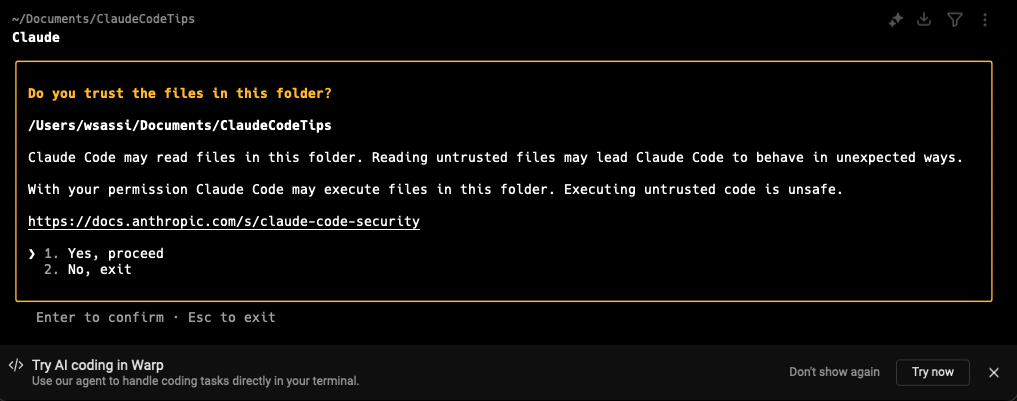
Authentication Setup
Claude Code offers a streamlined authentication process that connects directly to your existing Claude account. Here’s how the authentication flow works step by step.
Initial Authentication Process
When you first launch Claude Code, you’ll need to authenticate with your Claude account:
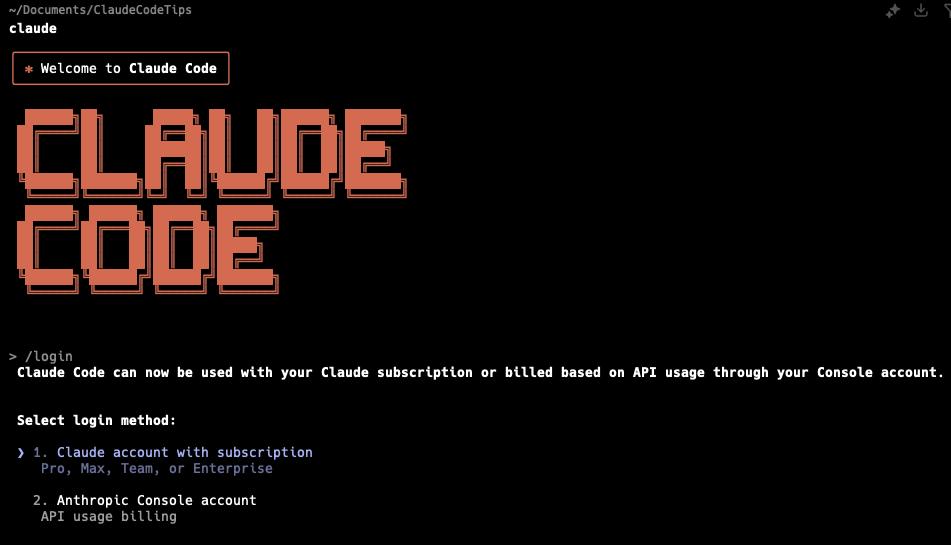
Once you execute /login, Claude Code presents you with two authentication options: Option 1: Subscription Plans (Recommended)
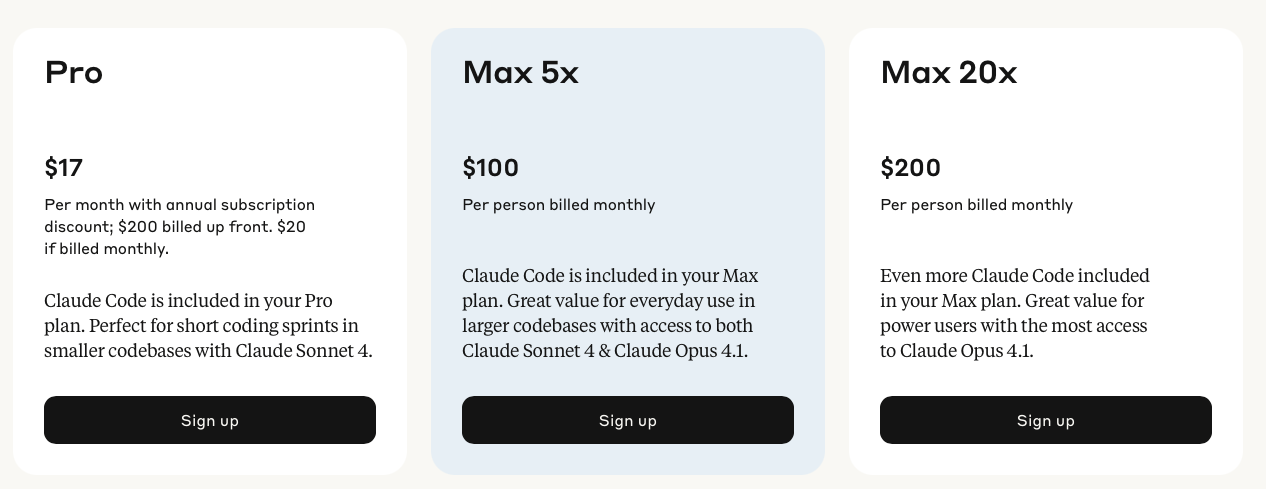
- Claude Pro ($17/month)
- Claude Max ($100/month)
- Claude Max ($200/month)
Option 2: Direct API Access
Completing Subscription Authentication
For most developers, selecting Option 1 (subscription plans) is the optimal choice: Selecting option 1 triggers the following sequence:
- Browser Redirection: Claude Code opens your default browser and redirects you to the Claude authorization screen.
- Account Verification: The system checks your existing Claude account and identifies your current plan (e.g., Claude Pro at $17/month).
- Permission Authorization: You’ll be asked to authorize Claude Code to access your Claude account.
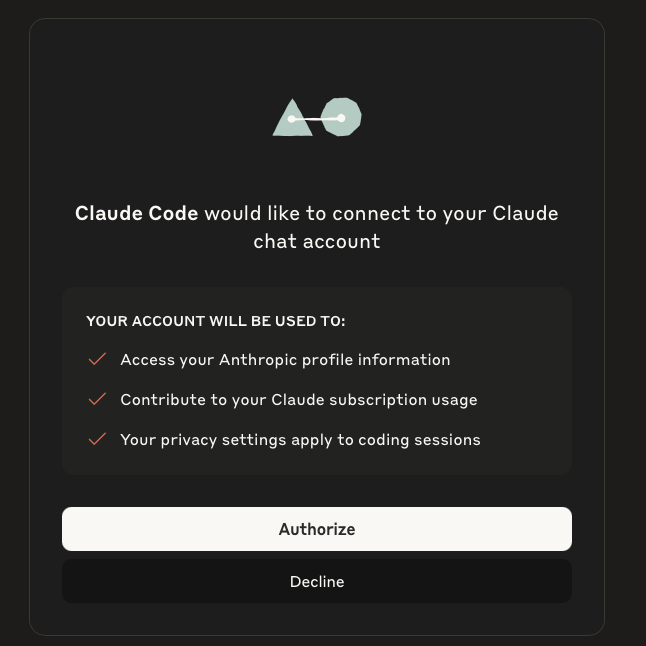
- Success Confirmation: Upon successful authorization, you’ll see a “Success” message in your browser.
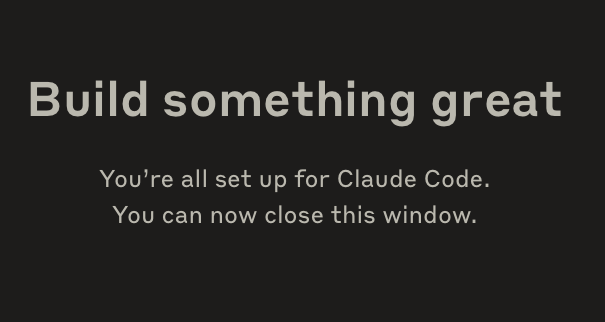
- Return to Terminal: Claude Code automatically detects the successful authentication and you’re ready to start coding
Claude Code provides simple commands to manage your authentication status:
# Check your current authentication and plan details
/status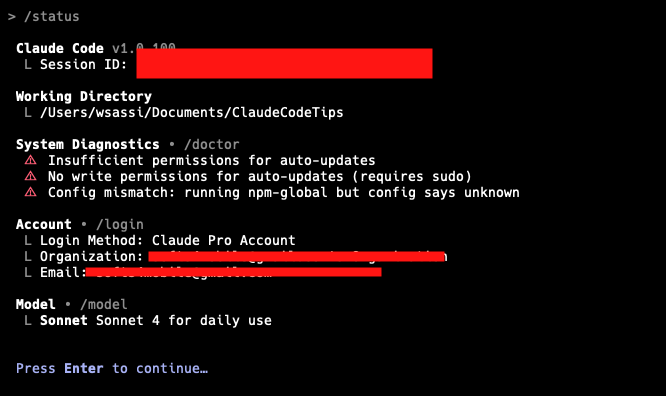
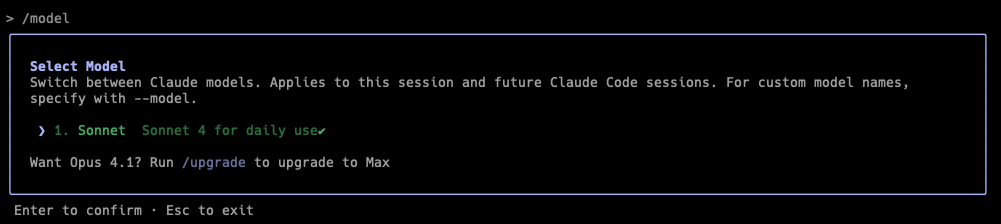
If you want to pass to an other model like opus 4, you can use /model command but you shoud pass to the max program.
Understanding Claude Code Pricing and Token Consumption
Pricing Structure
For team usage, Claude Code charges by API token consumption. On average, Claude Code costs ~$100-200/developer per month with Sonnet 4 though there is large variance depending on how many instances users are running and whether they’re using it in automation. Subscription vs API Pricing:
Claude Pro ($20/month): Good for light usage, includes Claude Code access but limited for intensive developmentClaude Max ($100/month): RECOMMENDED for most developers - 5x higher limits than Pro, includes access to Opus 4.1. Perfect for daily intensive usage up to 5h sessions (Claude’s maximum session length)Claude Max ($200/month): 20x higher limits than Pro, unrestricted access - only needed for teams or extremely heavy automation usage
Why Claude Max $100 is the Sweet Spot: The $100 Claude Max plan is ideally positioned for professional iOS developers because:
-
Full Opus 4.1 access: You get the most capable model for complex architectural decisions -
5-hour session support: Matches Claude Code’s maximum session length perfectly -
Daily intensive usage: Sufficient for 5+ hours of coding assistance daily -
Cost predictable: Fixed monthly cost vs variable API charges -
No usage anxiety: Work freely without micro-managing token consumption -
Real-world usage pattern: A typical developer using Claude Max $100 can code 4-6 hours daily with Claude Code assistance, mixing Sonnet 4 for routine tasks and Opus 4.1 for complex problem-solving, without hitting limits.
Monitoring Token Usage
Built-in Cost Command
The /cost command provides detailed token usage statistics for your current session:

Using Claude Code Usage Monitor Tools
you can Install monitoring tools for advanced tracking like ccusage
# Install ccusage for comprehensive usage analysis
npm install -g ccusage

# Basic usage reports
ccusage daily           # Daily token usage and costs
ccusage monthly         # Monthly aggregated report
ccusage session         # Usage by conversation session
ccusage blocks          # 5-hour billing windows

# Live monitoring
ccusage blocks --live   # Real-time usage dashboard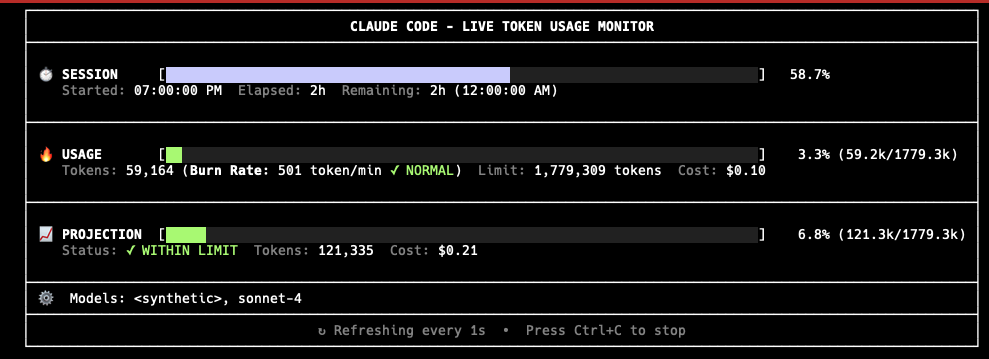
Live Dashboard with ccusage blocks --live
The ccusage blocks –live command provides a comprehensive real-time dashboard that displays:
Current Session Information:
- Session Start Time: When your current 5-hour session began
- Session Duration: How long you’ve been actively using Claude Code
- Time Remaining: Countdown showing time left in your current 5-hour session window
- Active Status: Whether your session is currently active or idle
Token Consumption Tracking:
- Tokens Used: Real-time count of input/output tokens consumed since session start
- Model Breakdown: Separate tracking for Sonnet 4 vs Opus 4.1 usage
- Cost Accumulation: Running total of costs for the current session
Cost Optimization Strategies
Beyond model choice, there are a few habits that can make your workflow leaner and smoother:
• Clear the slate often: Running /clear keeps Claude Code from carrying unnecessary baggage in its context, trimming down token usage.
• Cache your prompts: For workflows you repeat frequently, prompt caching prevents you from “paying twice” for the same context.
• Save your favorites: By storing your most common prompts in .claude/commands/, you create a personal library you can call upon instantly.
• Watch in real time: During heavy development sessions, keeping an eye on ccusage –live gives you a pulse on how much you’re spending, letting you adjust before costs balloon.
Taken together, these practices help you treat Claude Code not just as an assistant, but as a finely tuned partner,one that respects both your time and your budget.